Ctrl-C That Lands
Interrupting Claude mid-thought actually reaches it, including under the modern keyboard protocols Claude Code uses. Esc, Tab, arrows and Shift-Tab are one tap away.
Yes, you can use Claude Code from your phone. The trick to Claude Code on mobile: keep it running inside tmux on your server, attach from your iPhone with RETRO TMUX, and see at a glance whether it's working, done, or waiting for you.
$ tmux new -s agents && claude
# then, on your iPhone:
RETRO TMUX → your server → agents → you're in.
# Claude keeps working when you lock the phone. It lives on the server, not in your pocket.
// Why tmux //
A plain SSH session lives only as long as the connection. Close the laptop, lock the phone, walk into a lift: the connection drops, the server hangs up on your shell, and everything running in it dies. Claude Code included, mid-task. tmux keeps your terminal running on the server, so the connection becomes disposable. Close anything, open anything, and carry on exactly where you left off.
Start anywhere, finish anywhere. Kick off Claude on your laptop, check it from your phone in bed, answer it from your iPad on the sofa. Same session.
Nothing dies with the connection. Detaching is not quitting. The session runs until you kill it.
More than one thing at once. Claude in one window, your logs in another, a second agent in a third. Switch between them in a tap.
Your laptop and phone can both be attached. RETRO TMUX uses its own view, so your desktop layout isn't touched.
// Setup · about 5 minutes //
You need a machine that stays on (a small cloud server, a homelab box, or a Mac with Remote Login on), tmux 3.0 or newer on it, and Claude Code installed there.
On your server, open a named tmux session and start Claude Code in it. The session is what survives when you walk away.
$ tmux new -s agents
$ claude
Already running Claude outside tmux? Start the next task inside one. tmux can't adopt a process that's already running.
Tap + ADD HOST, enter your server's address, then generate an Ed25519 key right on the phone. Install it with your password once, and use the key from then on. TEST SSH checks everything before you save, with a Key → Server → Test walkthrough and a copy-paste install command.
Keys and passwords stay in the iPhone Keychain. No account, no cloud of ours in the middle.
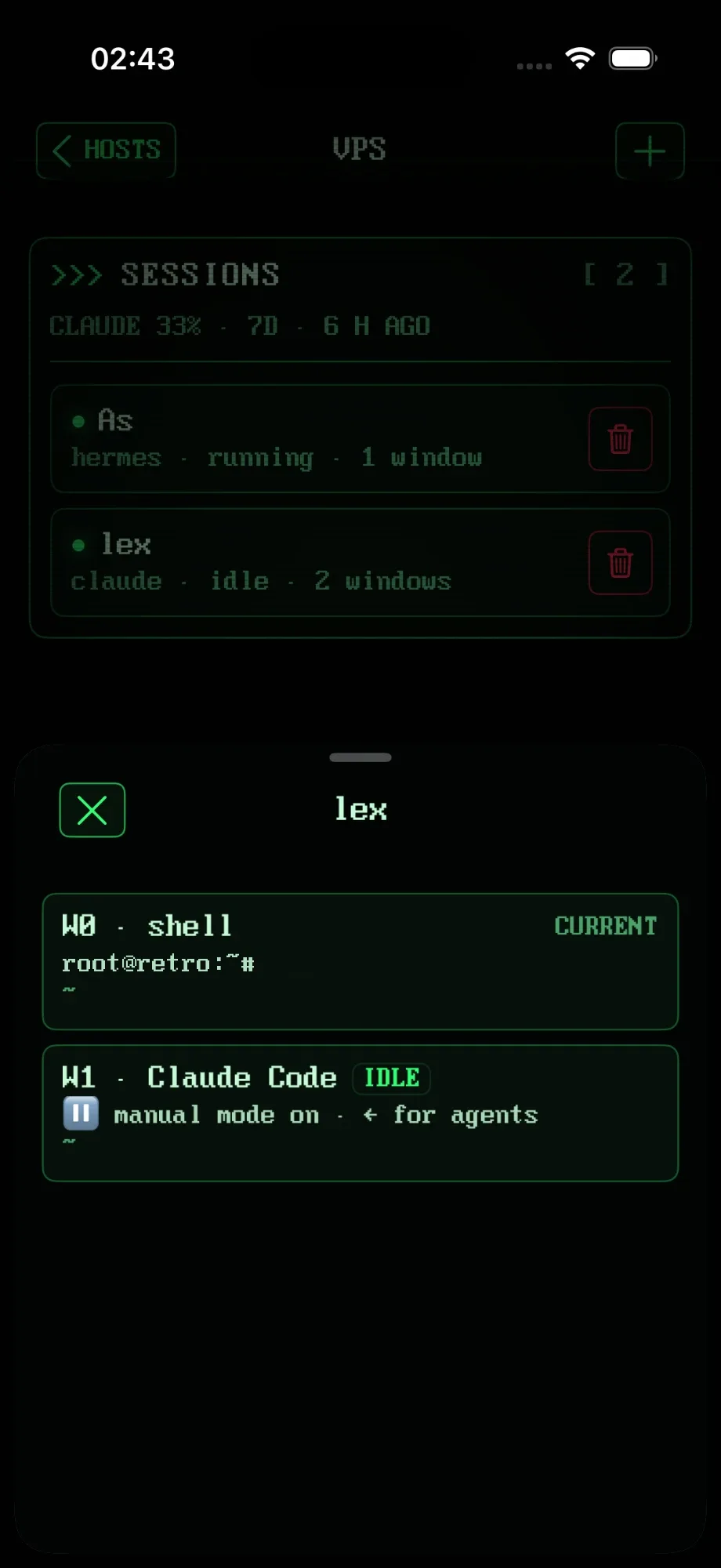
Open your server and tap agents. If the session has several windows, pick one: RETRO TMUX marks the window where Claude Code runs. History arrives exactly, line by line, including everything Claude printed before you attached.
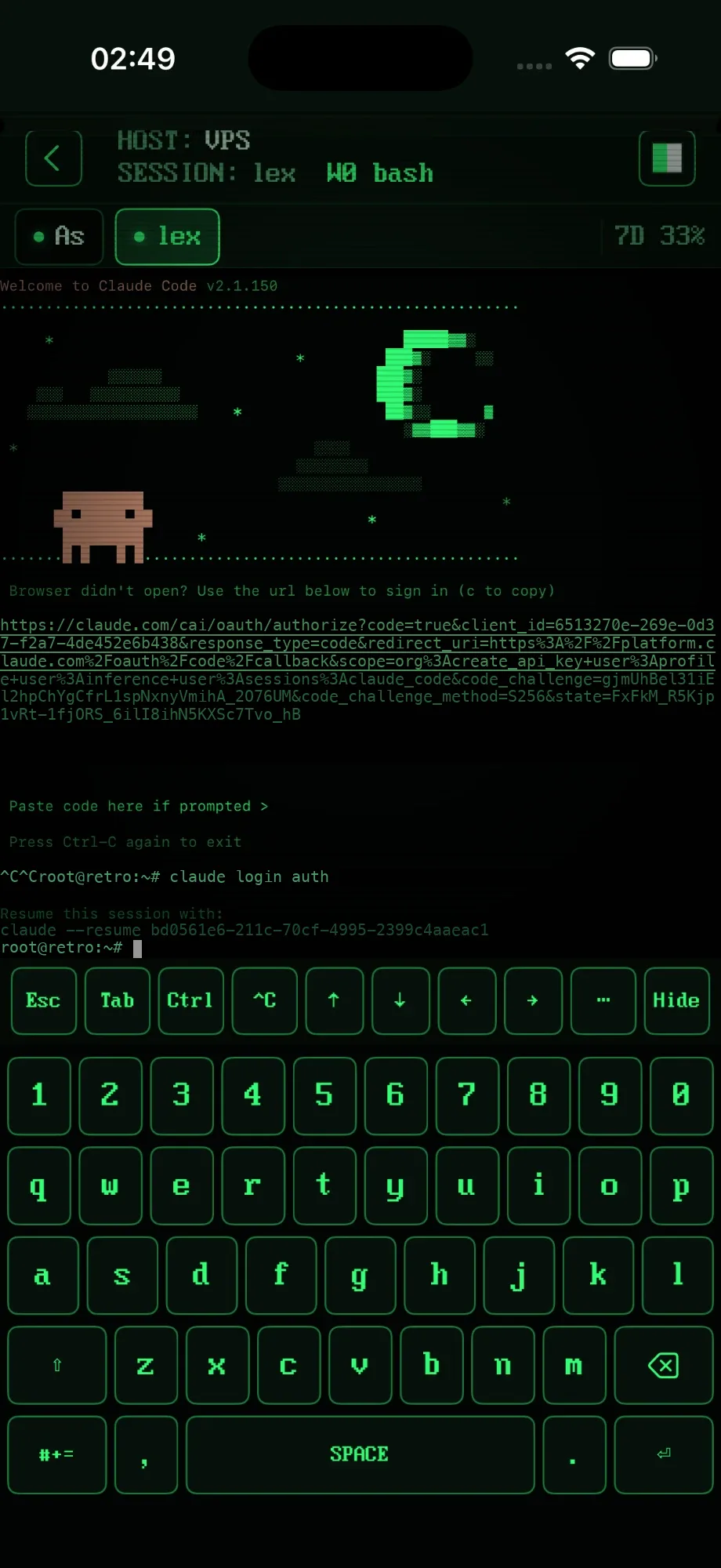
That's Claude Code, live, on your phone. The key row gives you Esc, Tab, Ctrl, a ^C that actually interrupts Claude, and arrows. Scroll its output with your finger, tap links to open them.
One switch installs small, reversible hook scripts on the server that report what Claude is doing. From then on the session list says working, needs you, done or idle, with your Claude usage as a percentage.
Leave the session, lock the phone, lose signal. Detaching never kills anything; Claude keeps working on the server. Come back in an hour, from your phone, iPad or laptop, and it's all still there.
# back at your desk, same session:
$ tmux attach -t agents
// Know when it needs you //
The worst part of Claude Code remote work is not knowing whether it's done, stuck, or politely waiting for a yes. RETRO TMUX tells you from the session list.
// Why a real terminal //
Interrupting Claude mid-thought actually reaches it, including under the modern keyboard protocols Claude Code uses. Esc, Tab, arrows and Shift-Tab are one tap away.
Never fewer than 80 columns, and the keyboard never resizes the grid, so Claude's interface doesn't re-draw itself every time you type.
Finger scrolling works inside Claude Code, and tapping a link lets you open or copy it. Select any text with drag handles.
The phone attaches through its own view session and restores window sizes and layout when it leaves. Your desktop tmux never notices.
Dropped link? It reconnects without replaying what you typed. The session never went anywhere.
On iPad, panes sit side by side exactly like tmux lays them out: Claude in one, logs in the other.
// Your options //
There's more than one Claude Code remote setup. Honest version: which one fits depends on where your code lives and how you sign in to Claude.
| Claude app (Code tab) | Any SSH app + tmux | RETRO TMUX | |
|---|---|---|---|
| Where Claude runs | Anthropic cloud, or your computer via Remote Control | Your server | Your server |
| Sign-in | claude.ai account required | Anything, incl. API key or Bedrock | Anything, incl. API key or Bedrock |
| The real terminal | No, a chat view | Yes | Yes, with a keyboard built for it |
| Knows when Claude needs you | Yes | No, you attach and look | Yes: working / needs you / done / idle |
| Codex & Hermes too | No | Yes, manually | Yes, with status |
| Our account or cloud | Anthropic's | Depends on the app | None. Keys stay in your Keychain |
If you only use Claude Code with a claude.ai subscription and don't need the terminal, the official Claude app may be all you need. We won't be offended. Much.
// FAQ //
Not a separate one. Anthropic's Claude app has a Code tab for cloud sessions and for Remote Control of a session on your computer (it needs a claude.ai account). If you want the real Claude Code terminal on your phone, run Claude Code in tmux on a server and attach with a tmux client like RETRO TMUX.
Run it somewhere that stays on, inside tmux: tmux new -s agents, then claude. From then on you can attach from any device over SSH (your iPhone, iPad or another laptop) and pick up exactly where Claude is, because the session never stops when you disconnect.
Yes. Claude Code keeps running on your server inside tmux, and your iPhone attaches to it over SSH. RETRO TMUX is a tmux client built for exactly that, with a keyboard that has a real Ctrl, Esc and arrows.
The machine running Claude Code has to stay on and reachable over SSH. A small cloud server or a home server works best, because it never sleeps.
Yes. RETRO TMUX doesn't care how Claude Code is signed in; it just attaches to the terminal it runs in. Anthropic's own mobile options (cloud sessions and Remote Control) need a claude.ai account.
No. It runs on your server inside tmux. Locking the phone, losing signal or closing the app only detaches; the session keeps going.
Not yet. Today you see "needs you" in the session list and in the session tabs. Lock-screen notifications with Approve and Deny buttons are on the roadmap.
Yes, it's one app for iPhone and iPad. On iPad, tmux panes sit side by side, so you can watch Claude Code in one pane and your logs in another.
>>> READY WHEN YOU ARE
RETRO TMUX is in beta. Join, and we'll tell you when there's a build to break.
+ JOIN THE BETAMore: what RETRO TMUX does · general FAQ