Ctrl-C That Lands
Stopping Codex mid-task actually reaches it. Esc, Tab, arrows and Shift-Tab are one tap away on the key row.
There are two ways to use Codex on your iPhone: Codex Remote in the ChatGPT app, which steers Codex on your Mac, or the real Codex CLI running in tmux on your server. RETRO TMUX is the second one: attach over SSH, answer Codex, hit a Ctrl-C that actually lands, and lock the phone while it keeps working.
$ tmux new -s agents && codex
# then, on your iPhone:
RETRO TMUX → your server → agents → you're in.
# Codex keeps going when you lock the phone. It lives on the server, not in your pocket.
// Why tmux //
Codex tasks run for minutes, sometimes an hour. A plain SSH session doesn't last that long on a phone: iOS suspends the app, the connection drops, and Codex dies halfway through a refactor. Inside tmux, Codex runs on the server, and your phone just looks in when you want it to.
// Setup · about 5 minutes //
You need a server that stays on (a cloud VPS, a home server, a Mac mini) with tmux 3.0 or newer and the Codex CLI.
Install tmux and the Codex CLI on the server, open a named session and start Codex in it. Sign in the first time: with your ChatGPT plan, Codex prints a sign-in link you can tap right in RETRO TMUX, and it opens in Safari. An API key works too.
$ sudo apt install tmux   # or: brew install tmux
$ npm install -g @openai/codex
$ tmux new -s agents
$ codex
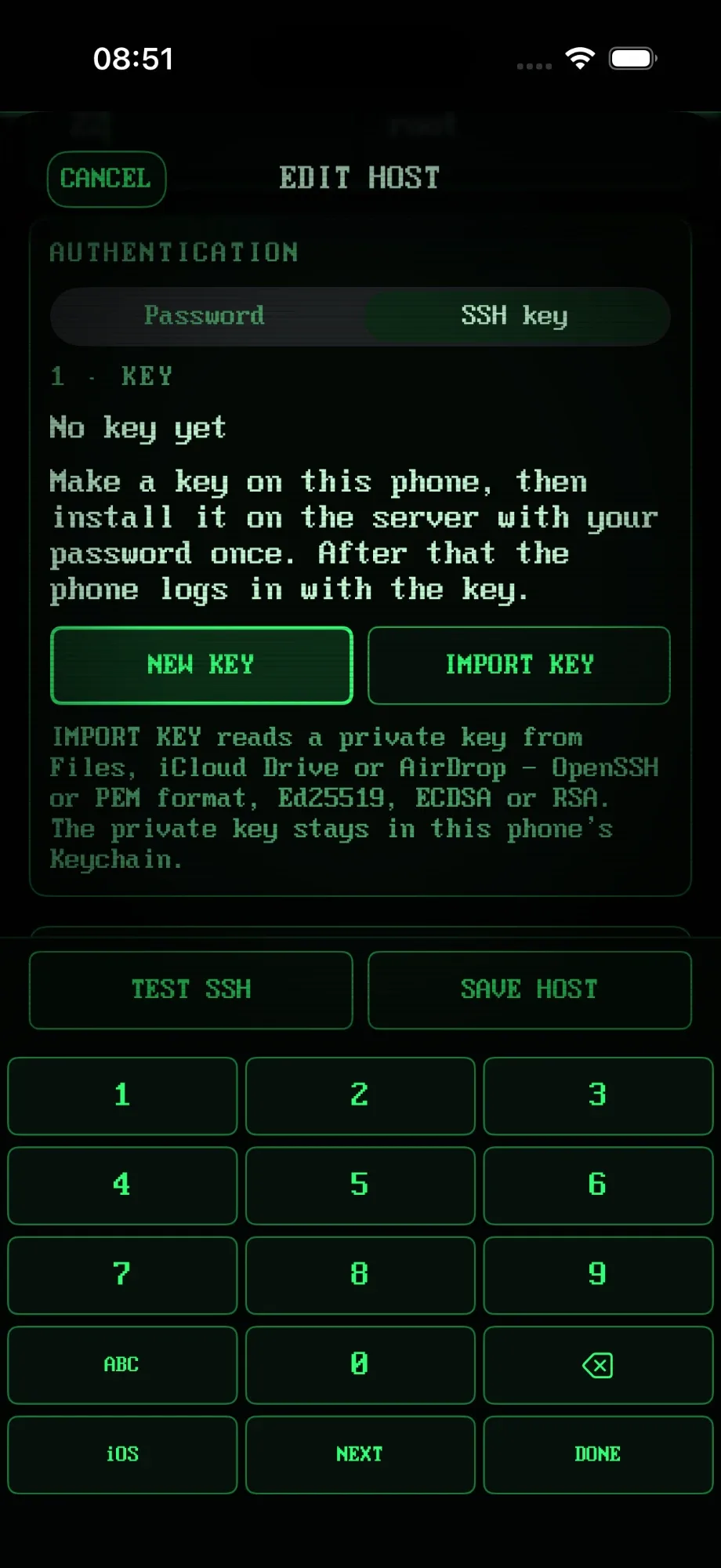
Tap + ADD HOST, enter the address, then generate an Ed25519 key on the phone. Install it with your password once and use the key from then on. TEST SSH checks everything before you save.
Keys and passwords stay in the iPhone Keychain, and Face ID locks the whole app. No account, and your SSH session goes straight to your server.
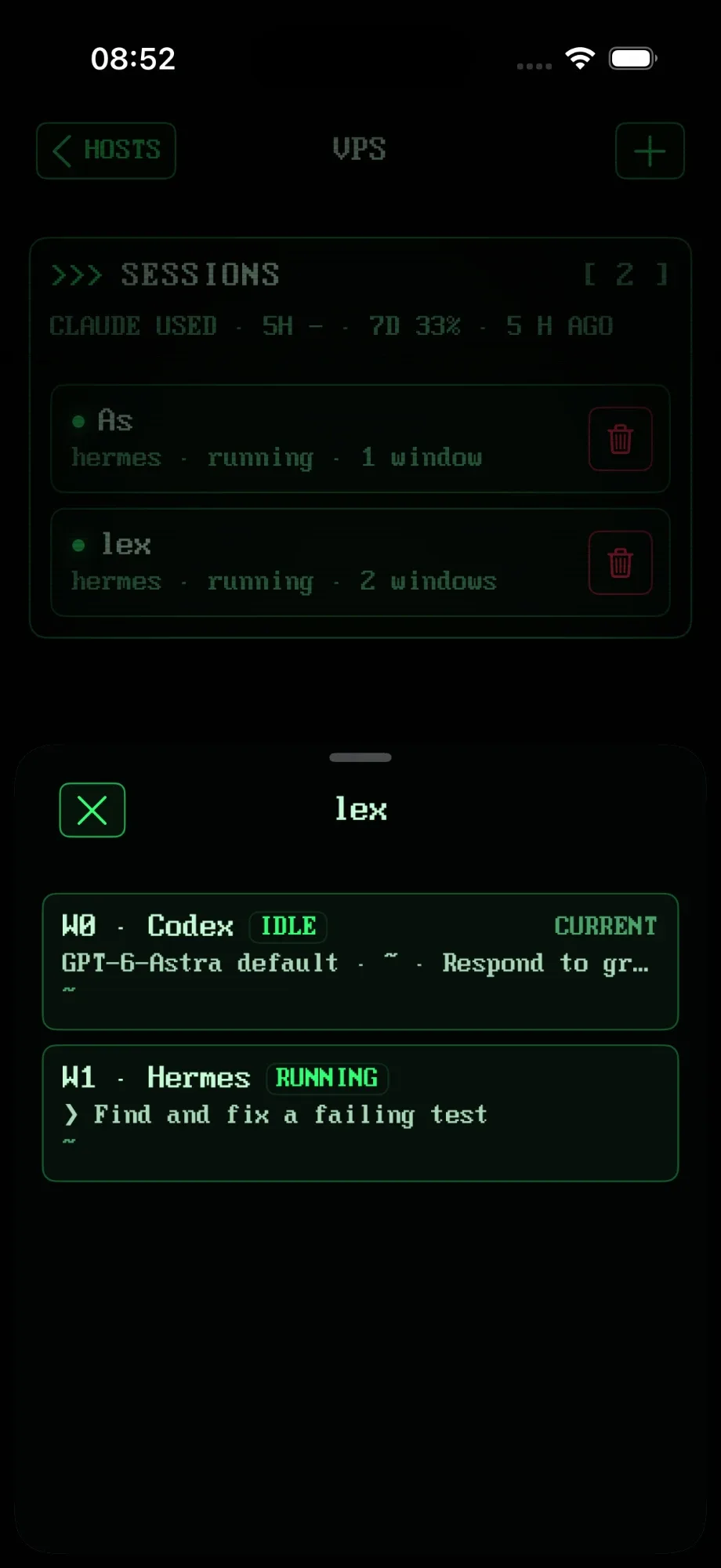
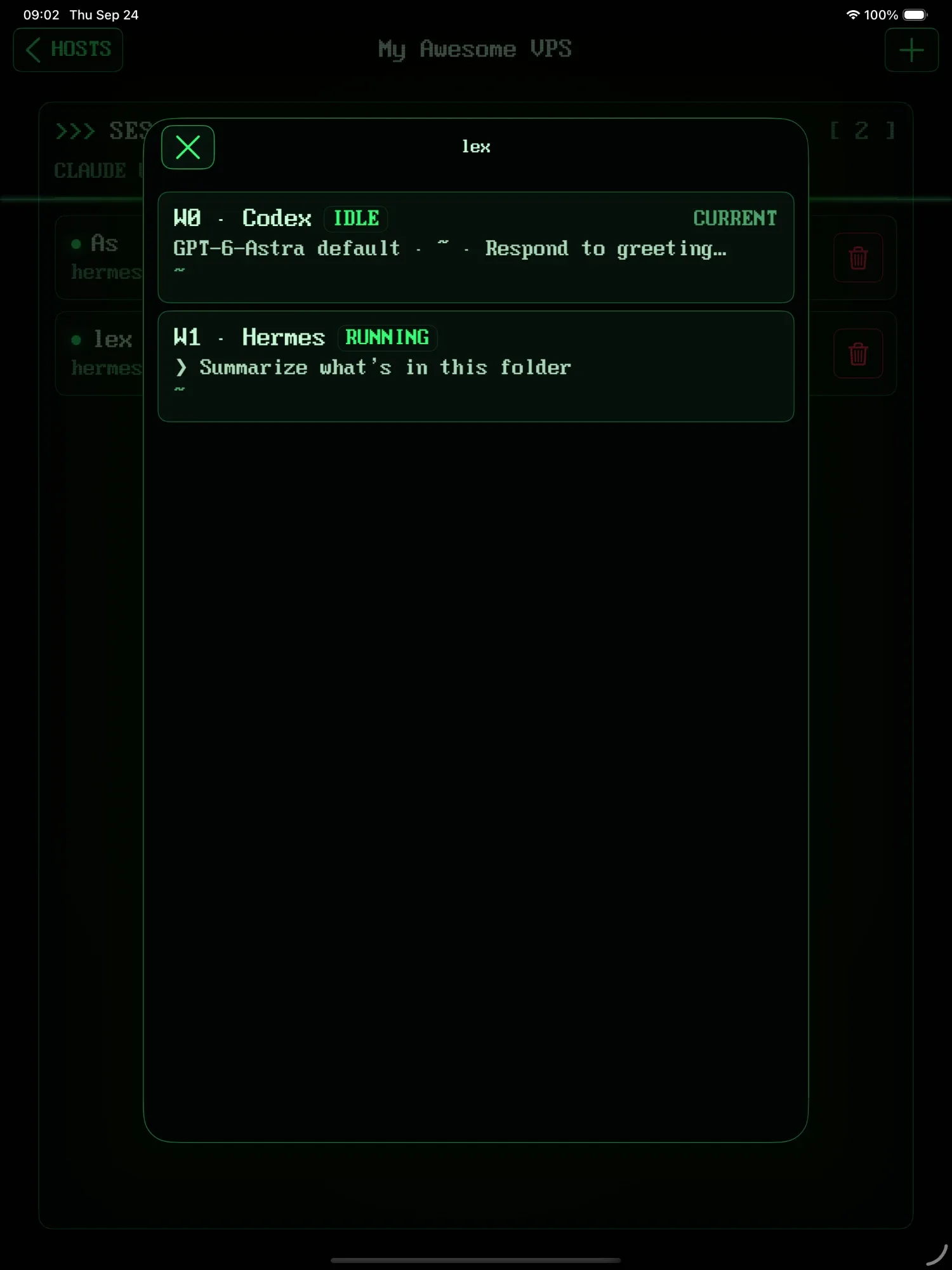
Open your server and tap agents. If the session has several windows, the picker shows which one runs Codex and what it's doing, and attaching lands on the agent's window.
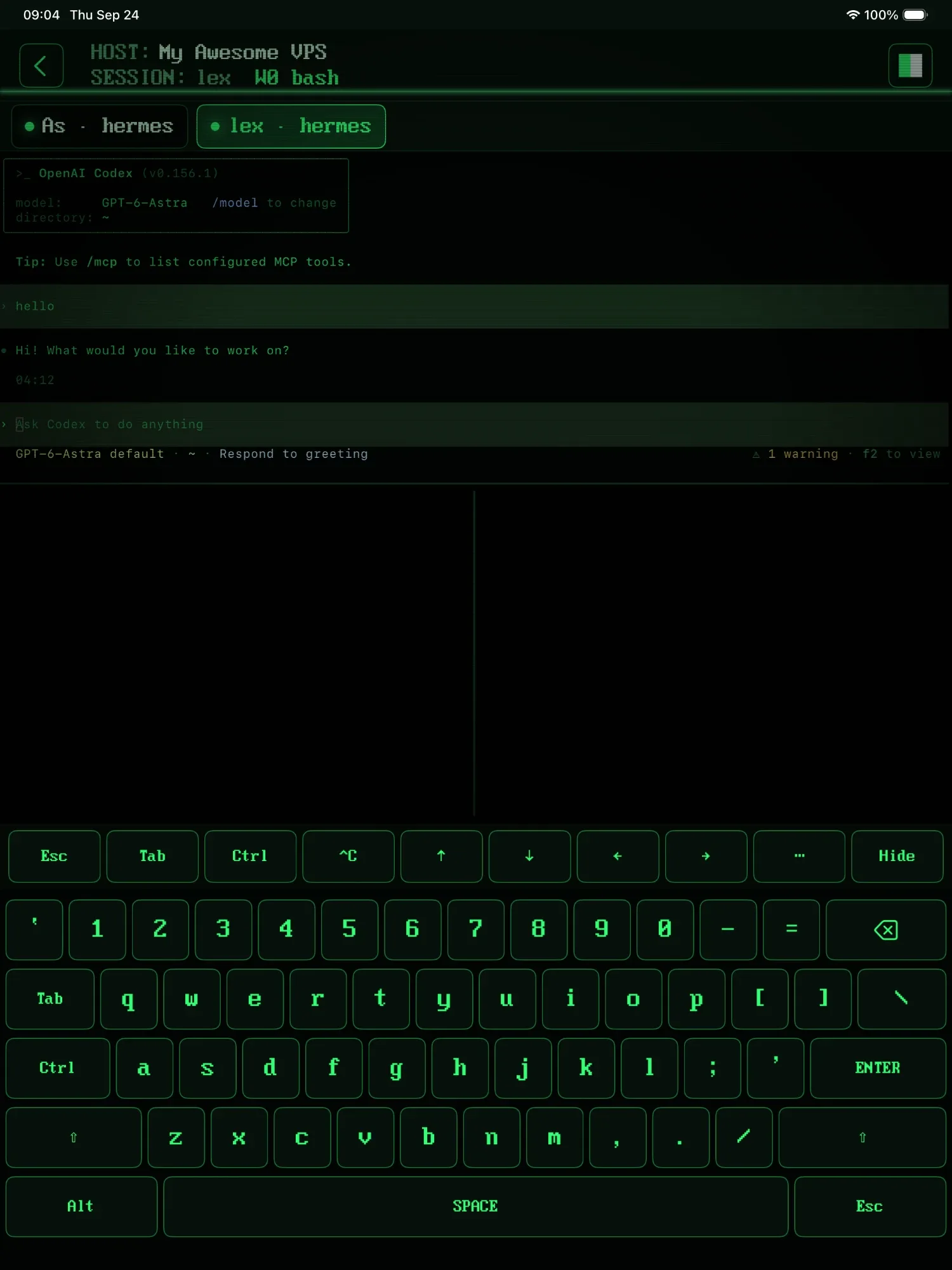
That's the Codex CLI, live. Type to it, answer its approval prompts, and press ^C when it needs stopping: the key row has Esc, Tab, Ctrl and arrows. On iPad, Codex sits in one pane and your shell in the others.
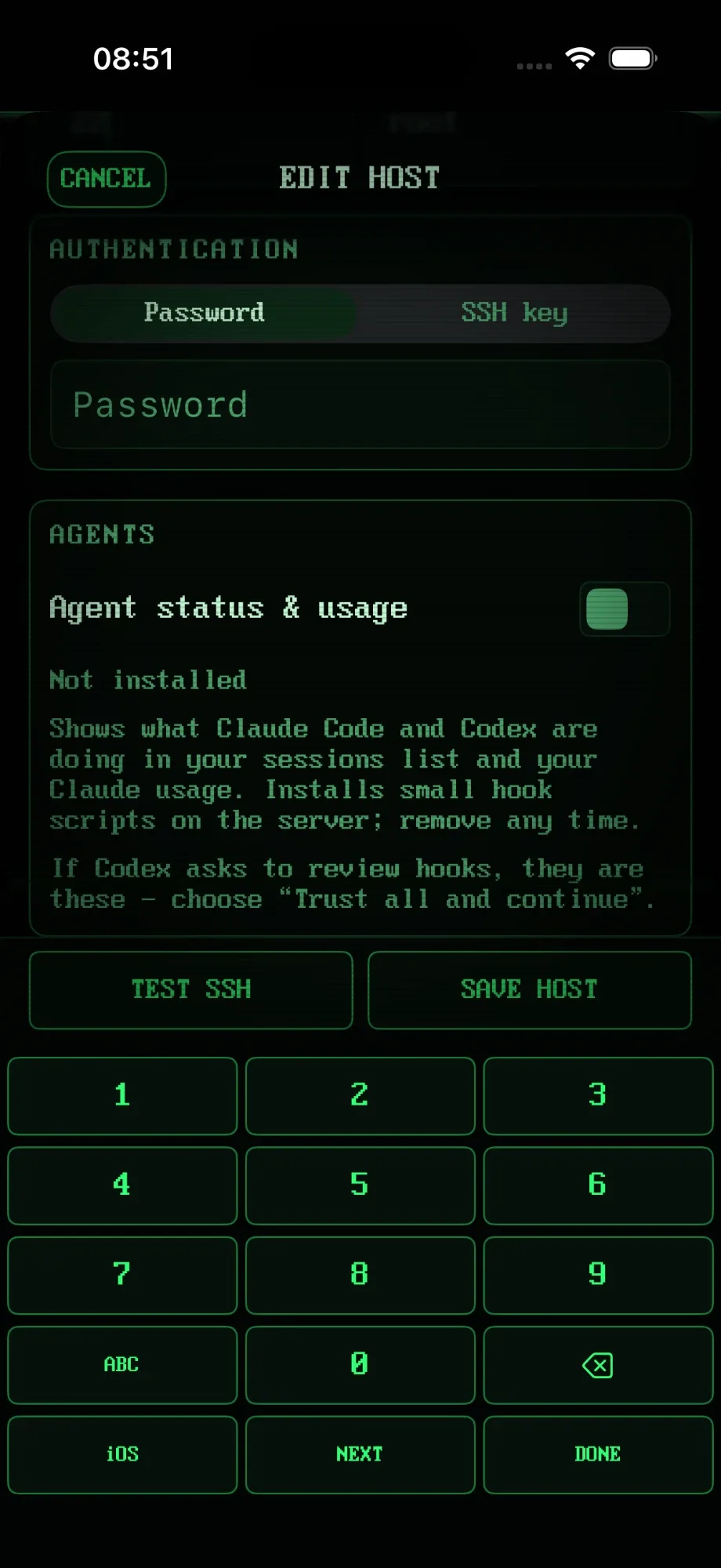
One switch installs small, reversible hook scripts on the server that report what Codex is doing. If Codex asks you to review the new hooks, they're these: choose Trust all and continue.
Leave the session, lock the phone, lose signal. Detaching never kills anything; Codex keeps working on the server. When you're back, each window shows what its agent is up to.
# back at your desk, same session:
$ tmux attach -t agents
// Know when it needs you //
Codex stops to ask before running something, and waits. Politely. For an hour, while you're at lunch. RETRO TMUX pings your phone the moment it asks, with Approve and Deny right on the notification, and shows every agent's state in the session list without attaching.
// Why a real terminal //
Stopping Codex mid-task actually reaches it. Esc, Tab, arrows and Shift-Tab are one tap away on the key row.
Never fewer than 80 columns. The keyboard only borrows rows and gives them back, and the width never changes, so Codex's output doesn't reflow every time you type.
Codex runs on a plain Linux server. Nothing on your desk has to stay awake, and no desktop app sits in the middle.
Use your ChatGPT plan or an API key. When Codex prints a sign-in link, tap it and finish in Safari. No laptop needed.
Codex in one window, Claude Code in another, Hermes in a third. One session list, one state per agent.
Tap UPLOAD, pick a screenshot from Photos (or just paste one), and its server path lands at the cursor, quoted. Then ask Codex what went wrong.
// Your options //
OpenAI's own Codex Remote is good, and for some setups it's the right answer. Honest version: it depends on where Codex runs and what has to stay switched on.
| ChatGPT app (Codex Remote) | Any SSH app + tmux | RETRO TMUX | |
|---|---|---|---|
| Where Codex runs | Your Mac or PC, or a machine it reaches over SSH | Your server | Your server |
| Has to stay on | The computer running the Codex app | Just the server | Just the server |
| Sign-in | ChatGPT account | Anything, incl. API key | Your ChatGPT plan (tap the sign-in link) or an API key |
| On the phone | A native view: tasks, approvals, diffs | The real terminal | The real terminal, with a keyboard built for it |
| Knows what Codex is doing | Yes | No, you attach and look | Yes: working / done / idle, without attaching |
| Claude Code & Hermes too | No | Yes, manually | Yes, with status |
If you live in the Codex app on a Mac that's always on, Codex Remote in ChatGPT may be all you need. If Codex is a CLI on a server, next to your other agents, that's what RETRO TMUX is for.
// FAQ //
Codex is inside the ChatGPT mobile app (in preview since May 2026). It connects to Codex running on your computer through OpenAI's relay, so you can follow tasks, approve commands and review diffs, as long as that computer stays awake and online. If your Codex is the CLI on a server, run it in tmux and attach from your phone over SSH instead: that's what RETRO TMUX is for.
Yes. Run the Codex CLI inside tmux on a server (tmux new -s agents, then codex) and attach to that session from your iPhone over SSH. You get the real Codex terminal, and it keeps working when you lock the phone.
Codex Remote in the ChatGPT app steers Codex running on your Mac or PC (or on a machine that app reaches over SSH) and shows it as a native mobile view: tasks, approvals, diffs. Codex in tmux is the plain CLI running on your server; you attach to its actual terminal over SSH, with nothing else that has to stay on.
Codex comes back. After a reboot, RETRO TMUX brings the session back, restarts Codex in it and tells it to pick up the task where it stopped. Automatically, without opening the app.
With Codex Remote, the computer running the Codex app has to stay awake and online. With tmux, only the server running Codex does, and a small cloud server or a home server never sleeps anyway.
Both. To use your ChatGPT plan on a server, start the sign-in in Codex and tap the link it prints: RETRO TMUX opens it in Safari, so you don't need a laptop. With an API key there's nothing to tap. Either way, RETRO TMUX just attaches to the terminal Codex runs in.
No. Codex runs on the server inside tmux. Locking the phone, losing signal or closing the app only detaches; the session keeps going.
Yes, and it's a good setup: one tmux session per agent, or one window each. RETRO TMUX detects Codex, Claude Code and Hermes and shows each one's state in the session list.
Yes. When Codex stops to ask for approval, RETRO TMUX sends a push to your phone with Approve and Deny on the notification, even with the app closed and the phone locked. The answer reaches Codex within seconds. The session list and tabs show it too: working, needs you, done or idle.
>>> READY WHEN YOU ARE
RETRO TMUX is in beta. Join, and we'll tell you when there's a build to break.
+ JOIN THE BETAMore: what RETRO TMUX does · Claude Code on iPhone · SSH on iPhone