Option As Meta
Terminal: Settings › Profiles › Keyboard › Use Option as Meta key. iTerm2: Settings › Profiles › Keys › Left Option key › Esc+. Now ⌥ sends Meta to tmux and your programs.
macOS doesn't ship tmux, but it's one command away. Here's how to install it, make it behave like a Mac app (mouse, clipboard, Option key), use iTerm2's tmux mode, and when a native tmux client for Mac makes more sense: when your tmux, and your AI agents, live on a server.
// Install · 1 minute //
macOS comes with a terminal and zsh, not tmux. Homebrew is the usual way to get it; MacPorts works too.
With Homebrew (or MacPorts, if that's your religion).
$ brew install tmux          # Homebrew
$ sudo port install tmux     # MacPorts
$ tmux -V
tmux 3.5a
Name it after the work, not "0". Detach with Ctrl+b then d; it keeps running. Attach again any time.
$ tmux new -s work
$ tmux attach -t work
// Make it feel like a Mac //
Out of the box, tmux on a Mac scrolls wrong, copies to its own buffer and ignores your Option key. Three small fixes in ~/.tmux.conf and one checkbox.
# ~/.tmux.conf
set -g mouse on                                  # scroll and select with the trackpad
bind -T copy-mode MouseDragEnd1Pane send -X copy-pipe-and-cancel "pbcopy"
bind -T copy-mode-vi y send -X copy-pipe-and-cancel "pbcopy"   # copies land in the Mac clipboard
set -g history-limit 50000
Terminal: Settings › Profiles › Keyboard › Use Option as Meta key. iTerm2: Settings › Profiles › Keys › Left Option key › Esc+. Now ⌥ sends Meta to tmux and your programs.
After editing the config, run tmux source-file ~/.tmux.conf. Your sessions keep running.
On tmux 3.2 or newer, set -s set-clipboard on lets copies reach the Mac clipboard through terminals that allow it. In iTerm2, let apps access the clipboard.
// iTerm2 + tmux //
iTerm2 can drive tmux in control mode: run tmux with -CC and every tmux window becomes a native iTerm2 tab. It works over SSH, too.
$ tmux -CC new -A -s work                         # local: create or attach "work"
$ ssh -t you@server tmux -CC new -A -s work        # the same, on a server
It's the same idea RETRO TMUX is built on: tmux's control mode, which sends every line once and in order. The difference is what's around it.
// When tmux lives on a server //
If your tmux runs on a server (and your Claude Code, Codex or Hermes run inside it), a terminal that attaches to one session at a time is only half the job. RETRO TMUX for Mac is a native tmux client: every server and session in a sidebar, every tmux window a tab, every agent's state in plain sight.
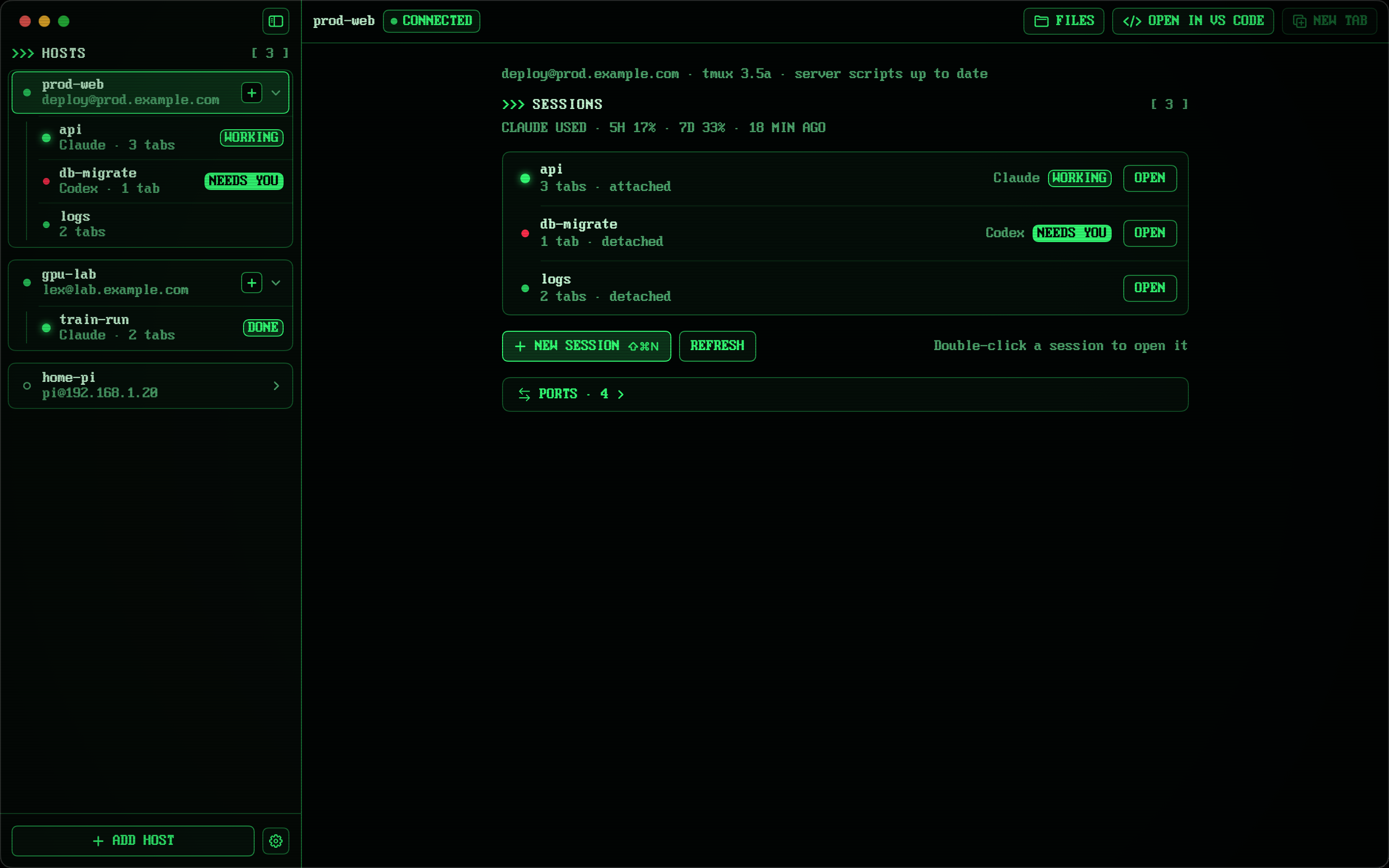
Servers and sessions down the side, tmux windows as tabs. ⌘T, ⇧⌘], ⌘F: the shortcuts you already use.
Claude Code, Codex and Hermes show as WORKING, NEEDS YOU or DONE, with Claude and Codex usage at a glance.
A file manager that opens in your terminal's folder. Drag in and out with Finder, rename, copy, move, open a terminal anywhere.
Open the folder in VS Code or Cursor on the server (Remote-SSH), or edit a remote file in any Mac editor and save it straight back.
An amber mark under every command you typed. ⌘↑ ⌘↓ jumps between them in a long scroll.
Every Ctrl key reaches your programs, Option works as Meta when you want it, and your desktop tmux is never resized behind your back.
> Everything the Mac app does → · Pricing: one subscription for Mac, iPhone and iPad →
// FAQ //
No. macOS ships zsh and Terminal, but not tmux. Install it with Homebrew (brew install tmux) or MacPorts (sudo port install tmux), then check it with tmux -V.
With Homebrew: brew install tmux. With MacPorts: sudo port install tmux. Then run tmux new -s work to start a session called work.
In Terminal: Settings › Profiles › Keyboard › Use Option as Meta key. In iTerm2: Settings › Profiles › Keys › Left Option key › Esc+. In RETRO TMUX for Mac it's a switch in Settings › General.
Turn the mouse on (set -g mouse on) and pipe copies to pbcopy, as shown in the setup section. On tmux 3.2 and newer, set -s set-clipboard on also works with terminals that accept clipboard escapes (in iTerm2, allow apps to access the clipboard).
It starts tmux in control mode, and iTerm2 turns each tmux window into a native iTerm2 tab or window. It works over SSH too: ssh -t you@server tmux -CC new -A -s work.
Yes: RETRO TMUX for Mac is a native tmux client (macOS 14 or later). It connects to your server over SSH and shows every session in a sidebar, every tmux window as a tab, and whether Claude Code, Codex or Hermes needs you. It also has a file manager over SFTP and Open in VS Code or Cursor.
Yes, that's what tmux on a server is for: start a session from the Mac, attach to it from the iPhone later. RETRO TMUX runs on iPhone, iPad and Mac on one subscription, and your hosts sync through your own iCloud.
>>> READY WHEN YOU ARE
RETRO TMUX is in beta on iPhone, iPad and Mac. Join, and we'll tell you when there's a build to break.
+ JOIN THE BETAMore: what RETRO TMUX does · tmux cheat sheet · Claude Code on iPhone