01 · Missing Isn't Zero
rate_limits only appears after the first reply in a session, and only on Pro and Max. A script that prints 0% when it's missing tells you you're fresh while you're at 97%. Print nothing instead.
You find out you've hit your Claude Code usage limit the fun way: mid-refactor, three files half-changed. Here's every way to check your 5-hour and weekly limits, a tested status line that keeps them on screen in Claude Code and tmux, and the traps we found wiring exactly that into RETRO TMUX.
# inside Claude Code. checking costs nothing:
› /usage
# two numbers matter:
# want them on screen all the time? keep reading.
// Ways to check //
Claude Code usage limits come in two windows on Pro and Max: a rolling 5-hour window that starts with your first message, and a weekly one. Claude Code, claude.ai and Claude Desktop all spend from the same pot. Here's where you can read how much is left, and what each way is good for.
| Where | What you get | The catch |
|---|---|---|
/usage | 5-hour and weekly percentages with reset times, inside Claude Code | You have to remember to ask |
| claude.ai → Settings → Usage | The same limits, in the browser | A browser tab away from your terminal |
| Status line | Always on screen, from rate_limits in the status line JSON | Pro and Max only, and it's only as fresh as the last reply |
| Log readers (ccusage and friends) | Tokens and estimated cost, from local session logs | An estimate, not your plan's percentage |
| RETRO TMUX | Claude and Codex usage on your iPhone, in the session list and on the agent's window, with the reading's age | You need the app. Which is in beta. Hi |
// A Claude Code usage status line · 5 minutes //
The status line gets rate_limits.five_hour and rate_limits.seven_day, each with used_percentage and resets_at (Unix seconds). This setup shows them in Claude Code and saves them to one file, so tmux, or anything else, can show them too. It already handles the traps below. You need jq.
Put it in ~/bin/claude-usage.sh. Already have a status line? Paste its command into PREV and it keeps working, with your usage added underneath.
#!/bin/sh
# ~/bin/claude-usage.sh: a Claude Code status line that shows your plan usage
# and saves it where tmux (or anything else) can read it.
input=$(cat)
cache="$HOME/.cache/claude-usage.json"
now=$(date +%s)
mkdir -p "${cache%/*}"
[ -s "$cache" ] || echo '{}' >"$cache"

# Merge this reading into the saved one. A window Claude left out keeps its
# last figure, unless that window's reset time has already passed.
printf '%s' "$input" | jq -c --slurpfile old "$cache" --argjson now "$now" '
  def pick(w): if .rate_limits[w] then .rate_limits[w]
               elif (($old[0][w].resets_at // 0) > $now) then $old[0][w]
               else null end;
  if .rate_limits then {ts: $now, five_hour: pick("five_hour"), seven_day: pick("seven_day")}
  else $old[0] end' >"$cache.tmp" && mv "$cache.tmp" "$cache"

usage=$(jq -r --argjson now "$now" '
  def w(k; name): if (.[k].resets_at // 0) > $now
                  then "\(name) \(.[k].used_percentage | floor)%" else empty end;
  [w("five_hour"; "5h"), w("seven_day"; "7d")] | join(" · ")' "$cache")

PREV=""   # your old statusLine command, if you had one
if [ -n "$PREV" ]; then
  printf '%s' "$input" | sh -c "$PREV"
  [ -n "$usage" ] && echo "$usage"
else
  model=$(printf '%s' "$input" | jq -r '.model.display_name // "Claude"')
  echo "[$model]${usage:+ $usage}"
fi
In ~/.claude/settings.json, merged with whatever's already there. The status line shows up after Claude's next reply; rate_limits doesn't exist before the first one.
{
  "statusLine": {
    "type": "command",
    "command": "sh ~/bin/claude-usage.sh"
  }
}
Save this as ~/bin/claude-usage-tmux.sh. It reads the saved file, hides a window whose reset time has passed, and says how old the reading is once it's older than two minutes.
#!/bin/sh
# ~/bin/claude-usage-tmux.sh: one short line for the tmux status bar.
cache="$HOME/.cache/claude-usage.json"
[ -s "$cache" ] || exit 0
jq -r --argjson now "$(date +%s)" '
  def w(k; name): if (.[k].resets_at // 0) > $now
                   then "\(name) \(.[k].used_percentage | floor)%" else empty end;
  [w("five_hour"; "5h"), w("seven_day"; "7d")] as $parts
  | if ($parts | length) == 0 then empty
    else "claude " + ($parts | join(" ")) +
      (($now - .ts) as $age
       | if $age >= 3600 then " (\($age / 3600 | floor)h old)"
         elif $age >= 120 then " (\($age / 60 | floor)m old)" else "" end)
    end' "$cache"
Then in ~/.tmux.conf, and tmux source ~/.tmux.conf:
set -g status-interval 15
set -g status-right-length 60
set -g status-right "#(sh ~/bin/claude-usage-tmux.sh) "
// The traps //
We hit every one of these putting Claude usage on a phone screen, where a wrong number is worse than none. Most usage status lines online fall into the first two.
rate_limits only appears after the first reply in a session, and only on Pro and Max. A script that prints 0% when it's missing tells you you're fresh while you're at 97%. Print nothing instead.
Each window can be absent on its own, and Claude Code drops one once its reset time passes. We've seen a reply carry the weekly window and a null five-hour one. Overwrite blindly and the 5-hour figure vanishes. Keep the last figure until its resets_at, then let it go.
The status line runs on events: a reply, a compaction, a setting change. A quiet session shows the figure from its last reply while your other sessions keep spending. That's why the tmux line says (10m old). A figure without an age is a guess with a percent sign.
Every session, and claude.ai in your browser, spends from the same limits. So one file for the whole account is right, and the newest reading wins. Showing a different figure per tmux pane just shows how old each pane's last reply was.
used_percentage can be 23.5. Shell arithmetic chokes on the dot, and printf %d refuses it. Round it in jq with floor and move on with your life.
Only one statusLine fits in settings.json, and people are attached to theirs. Wrap it: hand the previous command the same JSON and add your line under it. Uninstalling means putting theirs back, exactly.
// Or skip all of this //
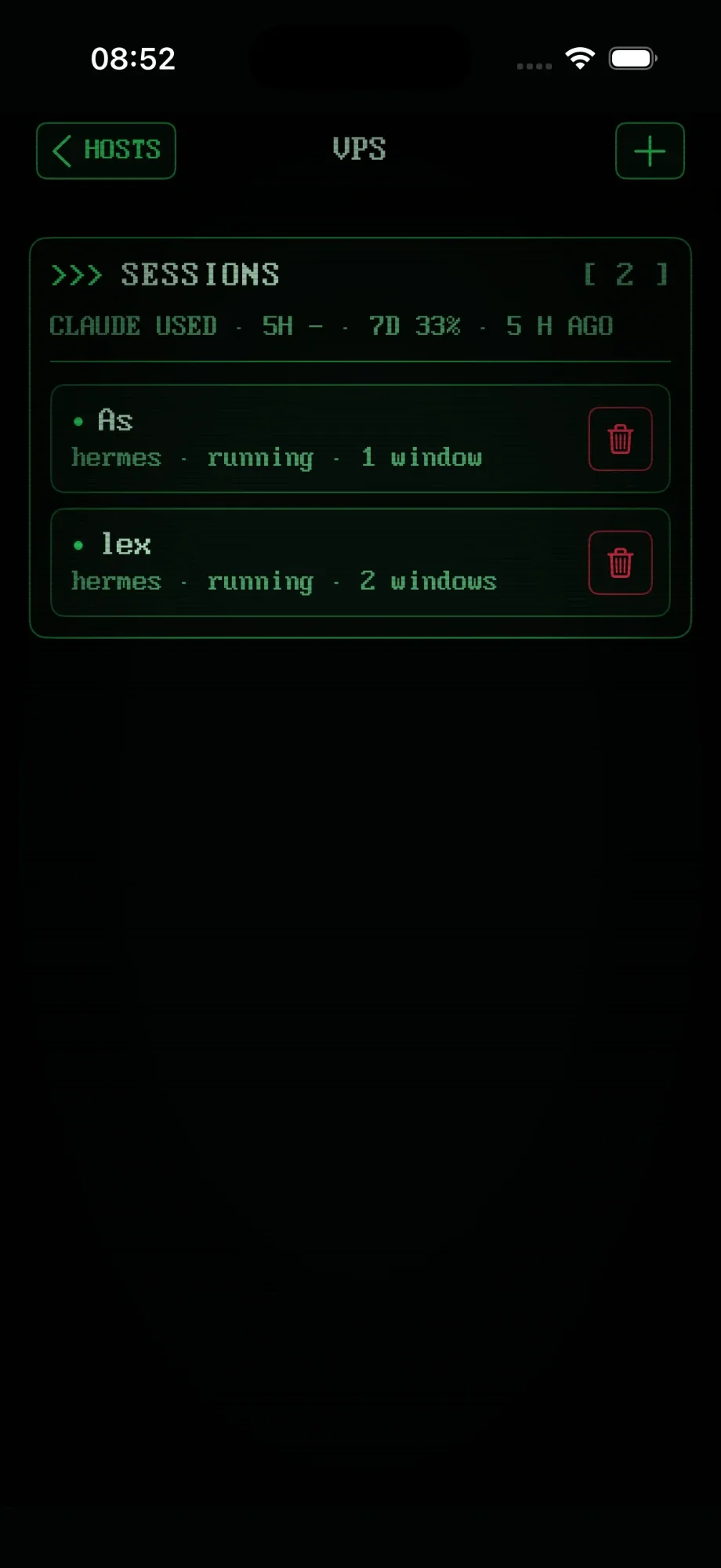
A status bar only helps when you're at the desk. RETRO TMUX's agent switch installs the status line wrapper for you, keeps your own status line exactly as it was, and puts your usage on your iPhone and iPad, next to the sessions spending it.
// FAQ //
Type /usage inside Claude Code. It shows how much of your 5-hour session window and your weekly window you've used, with reset times, and checking doesn't spend any of it. The same figures are in claude.ai under Settings, Usage. To keep them on screen, put them in your status line (the setup is on this page).
Pro and Max plans have two windows: a rolling 5-hour window that starts with your first message, and a weekly window. Claude Code, claude.ai and Claude Desktop all draw from the same limits, so a long chat in the browser counts too.
Claude Code only sends rate_limits to claude.ai Pro and Max subscribers (or behind a gateway that sets a spend limit), and only after the first reply in a session. On an API key you pay per token, so there's no percentage to show.
No. Tools like ccusage read Claude Code's local session logs and estimate tokens and cost. /usage and the status line's rate_limits are your plan's own percentages, straight from Anthropic. For 'how close am I to the limit', trust the second.
The status line only runs on events: a reply arrives, a compaction ends, a setting changes. An idle session keeps showing the figure from its last reply, while your other sessions keep spending. Save when each reading was taken and show its age.
Yes. RETRO TMUX shows Claude and Codex usage, 5-hour and weekly, in the session list and as a chip on the agent's window, with how old the reading is. It installs the status line wrapper for you and keeps yours working.
>>> READY WHEN YOU ARE
RETRO TMUX is in beta. Join, and we'll tell you when there's a build to break. Hopefully not your weekly limit.
+ JOIN THE BETAMore: what RETRO TMUX does · Claude Code hooks · Claude Code on iPhone