Your Sessions, Live
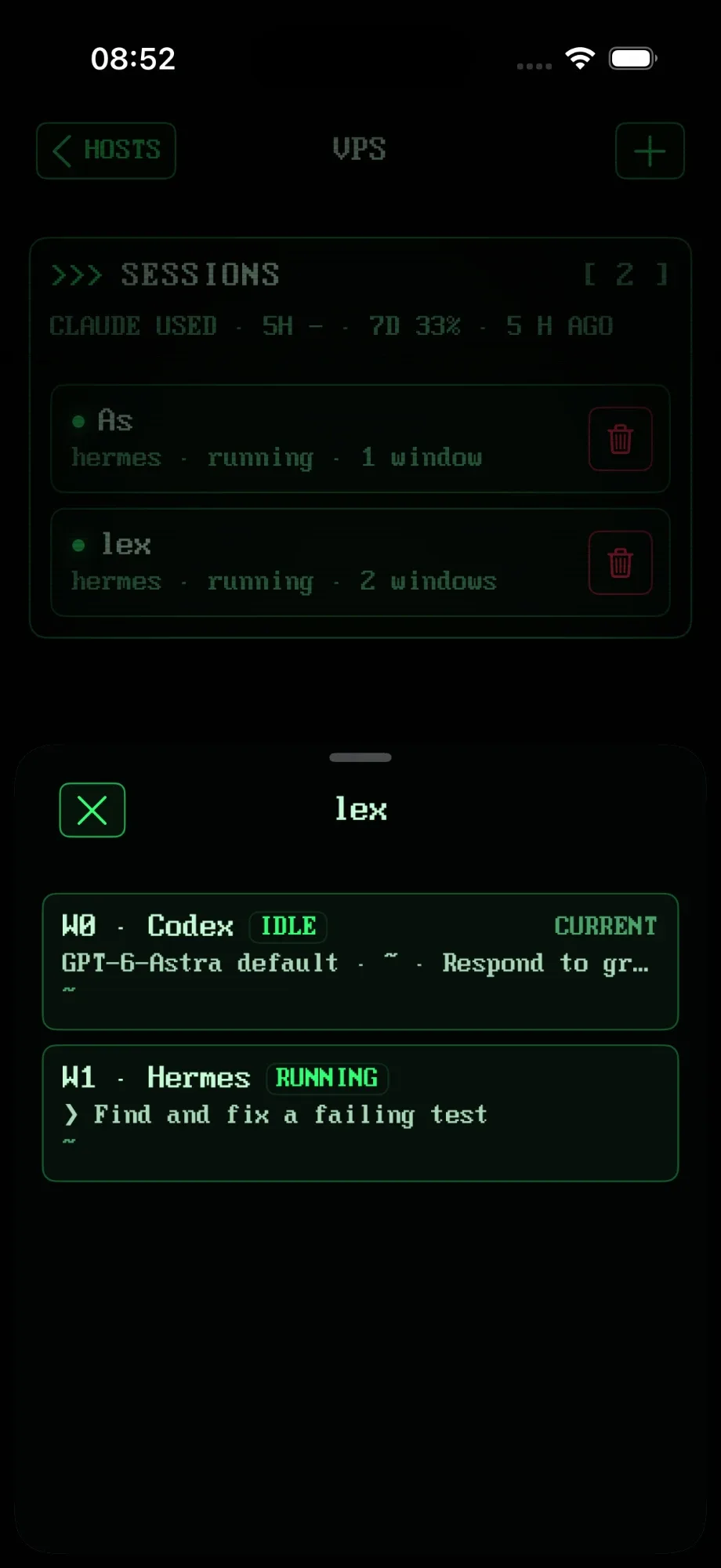
Open a server and see its tmux sessions, each with a pulse while it's alive. Tap one and you're in. No typing tmux attach with your thumbs.
Termius is a great SSH client, and most of it is free. What it doesn't do, at any price, is tmux: it runs tmux like any other program. RETRO TMUX is built the other way round. It drives tmux directly, so your sessions, windows and panes are the app, and it tells you what your AI agents are doing in them.
# an SSH client:
connect → type tmux attach → tmux draws itself in characters
# RETRO TMUX:
connect → your sessions, windows, panes and agents, live, one tap away
// Side by side //
Termius for iOS, Blink Shell and Prompt 3 are excellent SSH clients, and we're not trying to out-SSH them. This is the part none of them do: tmux and AI agents, as first-class parts of the app.
| Termius | Blink Shell | Prompt 3 | RETRO TMUX | |
|---|---|---|---|---|
| How tmux runs | As a program in the terminal | As a program in the terminal | As a program in the terminal | Driven through tmux control mode |
| Live list of your tmux sessions | No | No | No | Yes, with one-tap attach |
| Window picker | No | No | No | Yes, showing what runs in each window |
| Panes side by side on iPad | Drawn by tmux as characters | Drawn by tmux as characters | Drawn by tmux as characters | Native panes, each scrolling on its own |
| Exact scrollback | tmux copy mode, one pane at a time | tmux copy mode, one pane at a time | tmux copy mode, one pane at a time | Every line, in order, including output from before you attached |
| Leaves your desktop tmux alone | Windows can shrink to the phone's size | Windows can shrink to the phone's size | Windows can shrink to the phone's size | Yes, sizes restored when you leave |
| Agents come back after a server reboot | No | No | No | Yes: sessions restored, agents resume their work |
| AI agent status | No | No | No | Claude Code, Codex, Hermes: working / needs you / done / idle |
| Claude and Codex usage at a glance | No | No | No | Yes, 5-hour and weekly, with how fresh the reading is |
| Answer agents from the lock screen | No | No | No | Yes: Approve, Deny or Reply from the notification, the lock screen and the Dynamic Island |
Back to your agent
// Only here //
Open a server and see its tmux sessions, each with a pulse while it's alive. Tap one and you're in. No typing tmux attach with your thumbs.
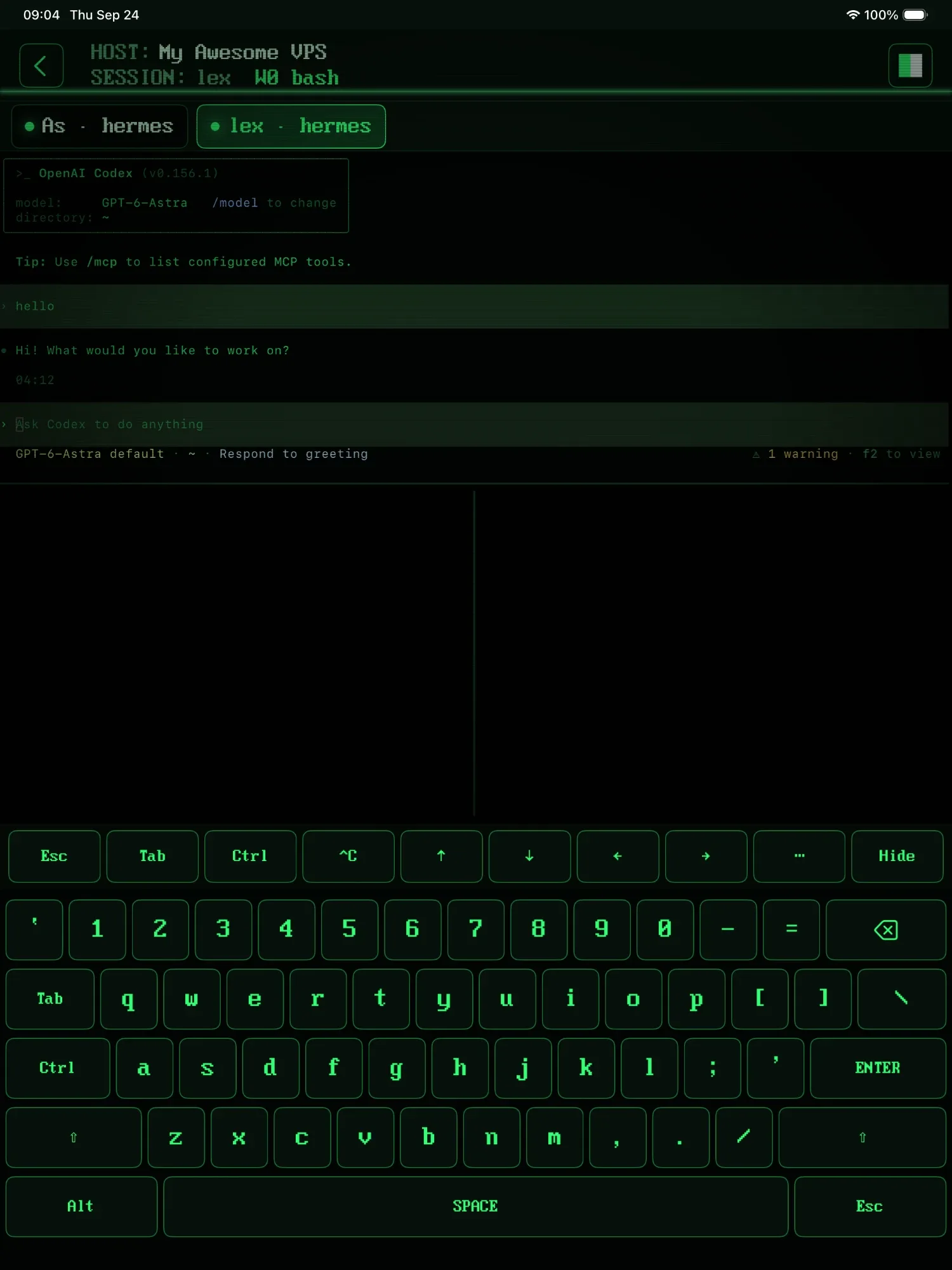
On iPad, tmux's panes become real panes, side by side, each scrolling on its own, even with the keyboard up. Double-tap to zoom one.
Claude Code, Codex and Hermes are detected in your sessions: working, needs you, done or idle, right in the list, without attaching.
Claude and Codex usage, 5-hour and weekly, with how old the reading is. Know before you hit the limit, not after.
Live status in the Dynamic Island, one card per agent window, and the agent's actual question on the lock screen: Approve, Deny, or type a reply without unlocking.
Server rebooted overnight? Your agent sessions come back on their own, and Claude Code, Codex and Hermes carry on with the work.
// Why tmux-first //
In an SSH client, tmux is a program drawing characters in one terminal: scrolling back means tmux's copy mode, one pane at a time, and attaching from the phone can shrink your laptop's tmux to the phone's size. RETRO TMUX talks to tmux through its control mode, so tmux's own sessions, windows and panes become part of the app, and your work keeps running on the server whatever the phone does.
> SSH from your iPhone → · Claude Code on iPhone → · tmux cheat sheet →
// FAQ //
If your work lives in tmux, one built around tmux. Termius, Blink Shell and Prompt 3 are SSH clients that can run tmux as a program; RETRO TMUX is a tmux client: it drives tmux through control mode, so your sessions, windows and panes are part of the app, and it shows what Claude Code, Codex and Hermes are doing in each one.
An SSH client gives you a terminal on a server, and tmux runs inside it like any other program, drawing its panes as characters. A tmux client talks to tmux directly through its control mode: it knows the sessions, windows and panes, lists them live, lays panes out natively and scrolls each one on its own.
Yes, and plenty of people will. Keep your SSH client for everything else, and open RETRO TMUX when you want your tmux sessions and agents. Both just talk to your server.
Not today, and for tmux work you won't miss it: your sessions live on the server, and when the connection drops the app reconnects with your history intact, without replaying what you typed. You pick up exactly where you were.
Yes: upload over SFTP. Pick a file or photo, or paste one, and it lands in the folder your pane is in, with the full server path typed at the cursor. Perfect for handing an agent a screenshot.
No. There's no sign-up; keys stay in your device's Keychain, hosts sync only through your own iCloud, and your SSH session goes straight to your server.
Yes. Add the host as Plain shell and you get an ordinary SSH login shell, with the same keyboard. The tmux parts (sessions that survive, windows, panes, agent status) need tmux.
>>> READY WHEN YOU ARE
RETRO TMUX is in beta. Join, and we'll tell you when there's a build to break.
+ JOIN THE BETAMore: what RETRO TMUX does · SSH on iPhone · tmux cheat sheet